Integrations: ClawBot meets the apps you already use
Your AI assistant is most useful when it can read your inbox, your calendar, and your meeting notes. ClawBot connects to the tools you already use — through OAuth, with the data kept in your private memory.
Available now:
Gmail — turn your inbox into a triaged feed
Gmail
Problem
You open your inbox and 80 unread messages stare back. Half are noise, ten matter, and you can't tell which is which without reading each one.
Why it gets worse
Every day you don't triage, the queue grows. Important threads get buried. By Friday you've answered the loud ones and missed the quiet ones.
What ClawBot does
- Generates a morning digest: "3 need a reply, 5 are FYI, 12 are noise."
- Drafts replies in your tone for the threads you've answered before.
- Remembers your priority senders so a quiet email from your CFO doesn't get filed under "noise."
Google Calendar — stop solving conflicts by hand
Google Calendar
Problem
Three meetings stack on top of each other. You ask three different people if they can move. They each ask you which time works.
Why it gets worse
Calendar tetris drains the same focus you were protecting by scheduling carefully. You either over-book or under-decide.
What ClawBot does
- Spots conflicts before they happen and proposes the move.
- Drafts the "can we shift to 2pm Thursday?" message in the right thread.
- Remembers your travel days, focus blocks, and weekly recurring patterns.
Zoom — every meeting becomes searchable
Zoom
Problem
You leave a Zoom call with eight half-decisions and zero notes. Three weeks later someone asks "what did we agree on?" and nobody knows.
Why it gets worse
Each lost decision becomes a re-meeting. You spend more time aligning than building.
What ClawBot does
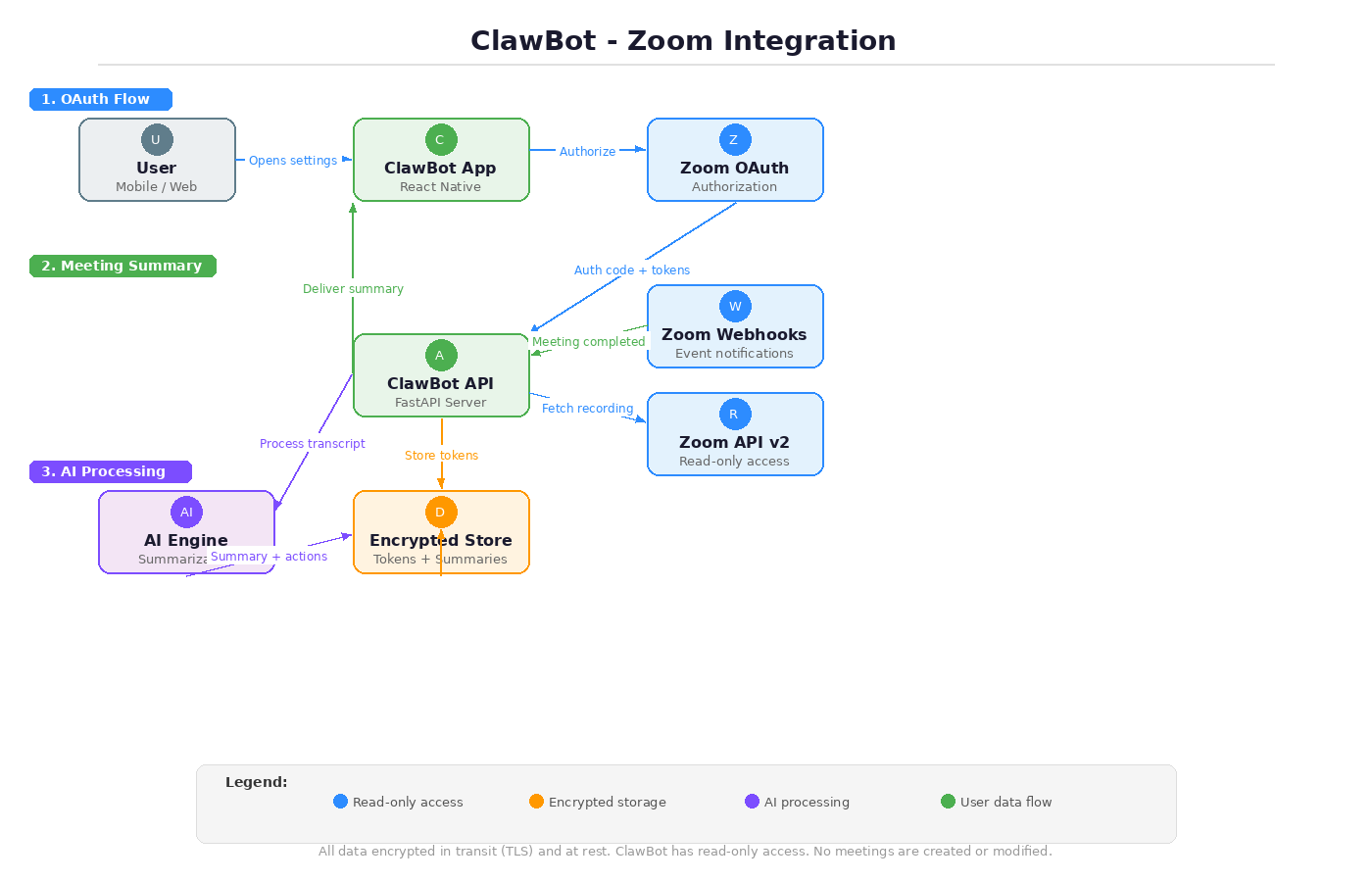
- After every call, drops a summary into your chat: key points, decisions, action items.
- Remembers the project, the participants, and what was unresolved last time.
- Searchable. Six weeks later you can ask "what did we decide about pricing in the call with X?" and get the answer in one line.
LinkedIn — post without losing your voice
Problem
You have something to say but writing the post takes 20 minutes and the result sounds like everyone else.
What ClawBot does
- Drafts a post in your tone, based on your past posts that did well.
- Suggests three angles you haven't used recently.
- Schedules and posts when you approve. No copy-paste.
Included with
The LinkedIn integration is bundled with the Content Agent ($29/mo) — the publishing crew that posts to X, LinkedIn, YouTube, and Chinese platforms on your connected accounts. Connect LinkedIn from Settings → Content Agent after subscribing.
Google Drive & Personal AI Database
Drive & Database
Connect Drive so your assistant can read documents you already have. Connect the Personal AI Database so structured records — clients, projects, watchlists — are available as first-class context. Your assistant stops asking "what's that file again?" and starts answering "here's the line in the doc you mean."
Gmail and Calendar start on Starter; Zoom and Google Drive are on Pro and above. LinkedIn ships with the Content Agent crew. See pricing →